Our game Vanaria needs to support lots of 2D characters, buildings, creatures and plants animated with Spine on screen at the same time. The Spine renderers available for Bevy all run the animation and the mesh deformation on the CPU and send fresh vertices to the GPU every frame. That works well for a handful of characters but gets expensive for thousands. I wrote a renderer that does it differently: bevy_spine_gpu keeps every skeleton’s meshes on the GPU and uploads only the bones each frame. Its feature set is currently more limited than that of the contenders, but, as we’ll proove later, that is not how the performance improvement is achieved.
Disclaimer: If you are looking for a maintained, feature-rich spine runtime that works with latest bevy, bevy-spine-gpu is not it; I currently don’t have capacity to maintain this outside of my own requirements. But if you want to build something on top of this or extend your spine renderer with some of these ideas, you are cordially invited.
This post is an overview: the numbers and the general idea of how to speed up the rendering. Future posts of the series will go into details of this. The code is publicly available at bevy-spine-gpu (the renderer) and bevy-spine-gpu-benchmark.
The numbers
I compared four renderers on the same scenes:
- spine-gpu: bevy-spine-gpu, the renderer this series is about.
- bevy_spine: jabuwu/bevy_spine, the established Spine plugin for Bevy. It wraps the official Spine C runtime.
- bevy_spine (direct): the same plugin with the “direct rendering” mode from PR #42, which packs the vertices of all characters into shared buffers instead of updating one Bevy mesh asset per attachment.
- spine2d: Latias94/spine2d, a Spine runtime written in Rust, with its Bevy integration.
Every character plays a random animation of “Ella” (27 bones, 18 slots), at a random phase.The window is 1920×1080, vsync is off, and the number is the median frame time over 15 seconds.
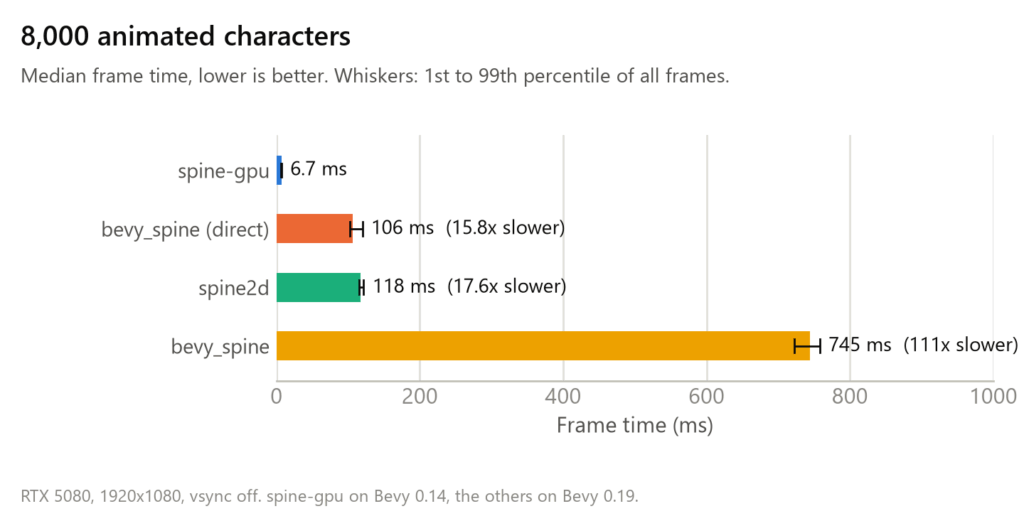
At 8,000 characters spine-gpu needs about 6.7 ms per frame. That’s 149 fps and 16 to 111 times faster than the other three. The gap stays the same when the scene gets harder: with three skeleton types, y-sorting and every character moving, it’s 7.5 ms against 107, 120 and 741 ms. Note the plog is log/log for readability:
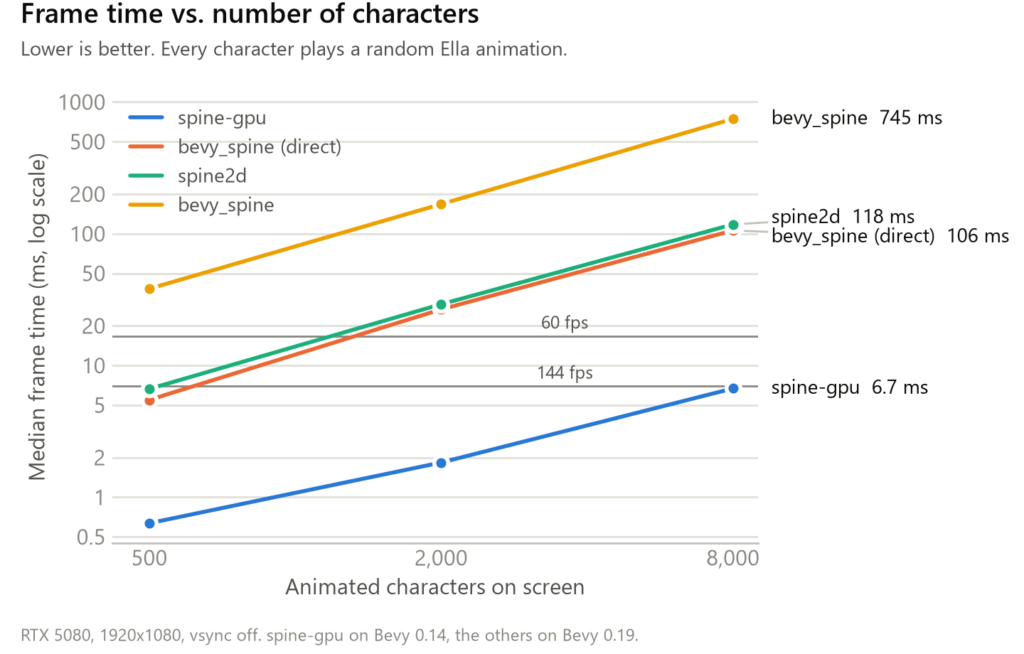
All renderers scale roughly linearly with the number of characters (hard to say for sure with 3 points ofc). spine-gpu grows a little slower at the low end, where fixed per-frame costs still matter, so the gap widens with the count: at 500 characters spine-gpu is 9 to 60 times faster, at 8,000 it’s 16 to 111 times. In terms of frame budget: bevy_spine is below 60 fps already at 500 characters, the other two somewhere between 500 and 2,000, and spine-gpu stays above 144 fps up to 8,000.
Spine-gpu runs on Bevy 0.14, the others on Bevy 0.19. All experiments where done on one machine (Ryzen 9 9950X3D, RTX 5080), your mileage may vary. The benchmark repository has everything needed to repeat these elsewhere, would be curious to see how this plays out on other setups.
Why the usual approach is expensive
A Spine skeleton is a hierarchy of bones. Images and meshes “hang” off the bones, and each mesh vertex is attached to up to four bones with weights. To draw a frame, a Spine runtime
- samples the animation to get every bone’s transform,
- moves every vertex of every mesh according to its bones (skinning),
- hands the resulting vertices to the renderer.
Steps 2 and 3 run per vertex and per frame, on the CPU. Then all those vertices have to cross the PCIe bus. I measured how much data arrives at the GPU per frame with Nsight Systems, at 2,000 characters:
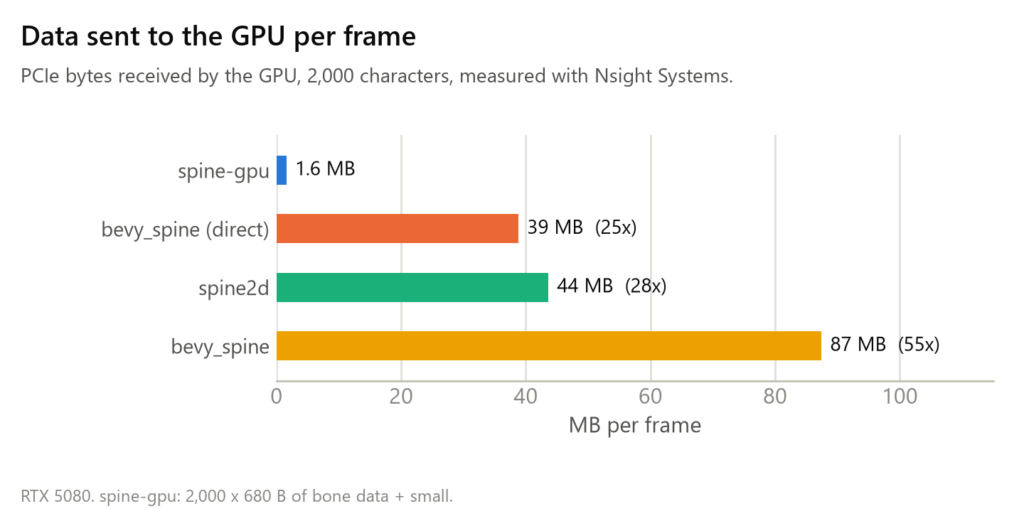

That’s 20 to 44 KB per character per frame for the other renderers, against 0.8 KB for spine-gpu. Producing those bytes is the expensive part: at 8,000 characters their main thread needs 95 to 173 ms per frame and their render thread 65 to 574 ms, while the GPU is busy for 13 to 109 ms. Some of that GPU time isn’t drawing either: bevy_spine creates around 38,000 new GPU buffers per frame at 2,000 characters, and each one costs a small copy on the GPU. Post 2 looks at the whole data path in detail.
The idea: meshes stay on the GPU, only bones move
Almost everything in a Spine skeleton is the same in every frame: the mesh vertices in their setup pose, which bones they’re attached to and with what weights, the texture coordinates. Only the bone transforms change.
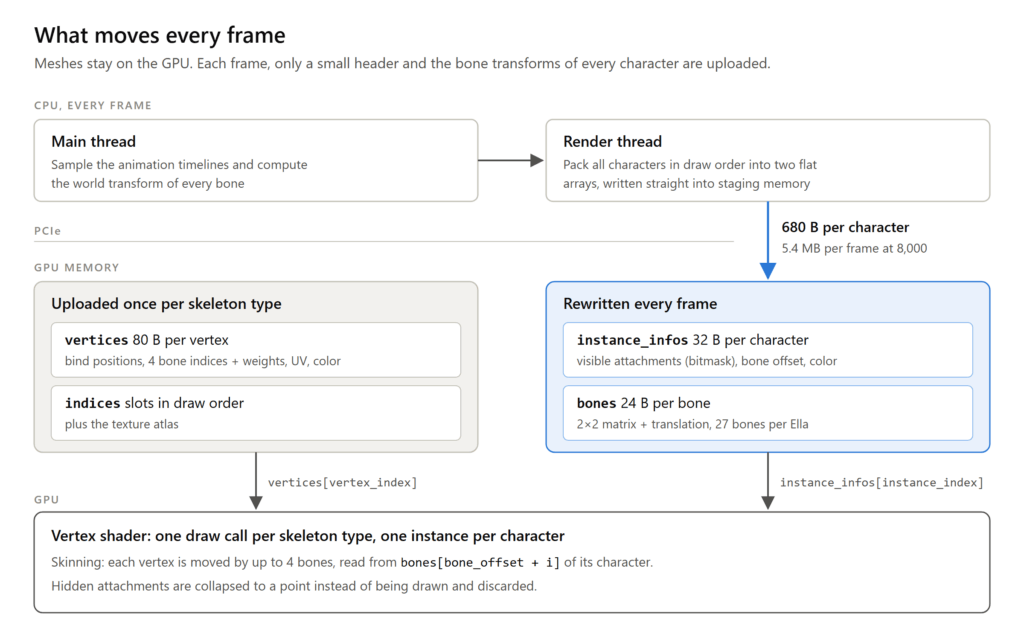
So spine-gpu uploads the static data once per skeleton type when it loads. Every frame, the CPU still samples the animations, but then it writes only a 32-byte header (which attachments are visible, color, where the character’s bones start) and the 27 bone transforms of each character into two flat buffers. That’s 680 bytes per character instead of tens of kilobytes. The vertex shader does the skinning: it reads the vertex from the static buffer, the bones of its character from the per-frame buffer, and computes the position. All characters of one skeleton type are a single instanced draw call.
None of this is new in game development; it’s how 3D engines have animated characters for a long time. Applying it to Spine in Bevy has a few twists, mostly around draw order, and that’s what posts 2 and 3 will be about.
Where the time goes now
At 8,000 characters the GPU is busy for 2.6 ms per frame and the render thread needs 0.7 ms. The main thread needs 6.4 ms, almost the whole frame: sampling 8,000 animations on the CPU is now the bottleneck. We will look more into that in a later post.
Is it fast because it does less?
spine-gpu does support fewer Spine features than the other three, which run a complete Spine runtime. It has bone timelines with linear, stepped and bezier curves, region and weighted mesh attachments, attachment and event timelines, skins and cross-fades. It does not have constraints (IK, transform, path, physics), deform timelines, clipping, blend modes or draw order timelines. The full table is in the repository.
For this benchmark that doesn’t matter: the animations the scenes play use nothing spine-gpu lacks. spine-gpu computes the same result as the official runtime: tests compare it against the Spine C runtime for every animation of the rig at 2,679 sample times. Bone transforms agree to about 1e-6, vertex positions to 0.003 pixels.
Which of the missing features fit this architecture is a fair follow-up question. IK or shear only change how bone transforms are computed, so they’d cost CPU time per bone but nothing per vertex. Deform timelines and clipping change the vertices themselves and don’t fit nearly as well. A later post will drill down on these differences.
Again, let me stress that no part of this or future posts is intended as criticism of the other renderers. bevy_spine and spine2d support all of Spine and are well maintained, something that spine-gpu currently can not deliver and which is what most games need. Also, spine-gpu wouldn’t exist without the official runtime to test against. As so often in knowledge work, we’re standing on the shoulders of giants.
Next in this series
I’ll upload a few more articles in this series, topics will likely be:
- The data path from CPU to GPU (what’s uploaded, data layout).
- How to avoid extra draw calls and still get character overlaps right.
- Current bottlenecks & potential spine feature extensions.
1 thought on “Bevy-spine-gpu (1/4): Rendering 8,000 animated characters at 144 fps”
Comments are closed.